


Details
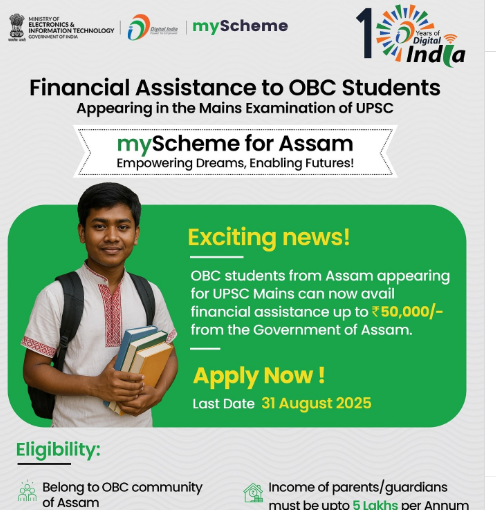
The ‘Financial Assistance to OBC students appearing in the Mains Examination of UPSC’ scheme, administered by the Directorate of Welfare of Scheduled Castes and Backward Classes, Government of Assam, is designed to provide financial grants to Other Backward Classes (OBC) students who qualify for the Union Public Service Commission (UPSC) Mains Examination. Each eligible beneficiary will receive an amount of up to ₹50,000/-, subject to budgetary provisions. The disbursement of assistance is contingent upon the applicant satisfying the stipulated eligibility criteria and the successful submission of required documentation.
A DigiLocker account is required for application. Please refer to the Application Process section for details.
Benefits
An amount of up to ₹50,000/- will be provided to each beneficiary, subject to budget provision.
Eligibility
The applicant must belong to a Other Backward Class (OBC) community of Assam.
The applicant must have recently qualified for the Union Public Service Commission (UPSC) Preliminary Examination held in 2025.
The annual income of the applicant’s parents/guardians must not exceed ₹5,00,000/-.
Application Process
Online
Signup to DigiLocker
Step 1: Visit the DigiLocker Portal or download the DigiLocker Mobile App (Android / iOS).
Step 2: Click “Login/Register” and provide these details: Full name, Gender, Mobile number, Email ID, and Aadhaar Number. Create a 6-digit PIN.
Step 3: Finally, click “Submit”. Note the 6-digit PIN for future reference.
Signin to myScheme
Step 1: At the top right corner of this page, click “Sign In”. Provide your DigiLocker Mobile Number and the 6-digit PIN.
Step 2: Click the “I consent to terms of use” checkbox, then click “Sign In”. You will be directed to the DigiLocker Consent Page.
Step 3: At the bottom of the page, click “Allow”. You have now successfully signed in to myScheme.
Scheme Application
Step 1: At the top of this page, click “Apply Now”. The application form of the scheme will open.
Step 2: Fill in all the mandatory fields of the application form, and upload all the mandatory documents in the specified format and size.
Step 3: Carefully review all the information provided and the documents uploaded. Make any necessary corrections.
Step 4: Click “Submit”. You’ll receive the following confirmation message: “Form Submitted Successfully!”.
Step 5: For future reference, click “Print” to print the form or to download the filled form as a PDF file. Else, click “Ok” to get redirected to the myScheme landing page.
Helpdesk Contact Details
Email: assamdirectorateofwelfareofsc@gmail.com
Mobile Number: 8638922415
Documents Required
Caste Certificate (valid OBC certificate, inserting sub-caste)
Parents’ Annual Income Certificate, issued by the Circle Officer
Admit Card of Preliminary Examination
Proof of Qualification in UPSC Preliminary Examination
Self-attested Front Page of the Passbook
Aadhaar Card/PAN Card
Specifications for Photo Upload
Filetype: JPEG/JPG. Filesize: Between 50KB and 3MB.
Specifications for Document Upload
Filetype: PDF. Filesize: Between 300KB and 3MB.
Disclaimer
Hamara Neta is an independent, private application developed and maintained by HANSA AI TECHNOLOGIES. This app does NOT represent any government entity and is NOT affiliated with, endorsed by, or connected to any government body. Official government services should be accessed directly through their respective government portals.